Building an AI Agent for USThing Devs: Some Observations
As a tech lead at USThing, I’m always looking for ways to help our student-led development team work more efficiently. One recurring challenge is helping developers get enough context to work on systems they didn’t build.
That context is spread across GitHub repositories, Notion documents, Discord discussions, email, and development machines. Even a question about an API can mean searching several places and finding someone who remembers the implementation. As AI assistants such as ChatGPT and Claude became more common in everyday work, I felt it was time to build a shared AI agent for our team. I wanted it to bring that context together in one conversation.
Block engineers described a similar need in WIRED’s May 2025 report on Goose. They found the agent especially useful for understanding unfamiliar codebases.
Where do we put the Agent?
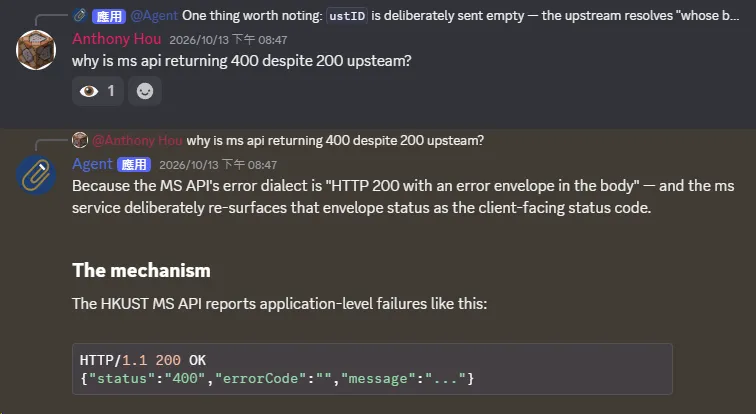
Most communication in the USThing Devs team already happens on Discord, so I put the Agent there. Members mention it to start work and reply to continue the conversation.
Discord’s APIs for building bots are well designed and supported. That made it a practical interface for experimenting with the Agent.
Slack’s engineering team describes a similar approach to internal support: a bot that draws on technical documentation, past channel discussions, and shared canvases. Their experience points to the same advantage of answering questions where the team already talks.
How the Agent works
I chose the Claude Agent SDK to power the Agent using the same harness as Claude Code. The SDK provides the agent loop, tools, and context management. I wanted an established starting point, and community projects already connect it to Discord and Slack, giving me integration patterns to build on.
We could also experiment with other coding harnesses to power the Agent down the line.
The system has three layers:
One Agent. Independent conversations.
Discord
“Trace this API.”
“Check service config.”
Agent
Queues · permissions · persistence
Reasoning & tool use
Tools
Discord handles the conversation. It provides channels and threads for questions, conversation history, and progress notifications.
Session management connects the turns. Each Discord conversation maps to its own agent session. The session manager queues messages while a session is busy, formats streaming output, and saves session state.
The backend and its tools do the work. The backend reasons through the request and uses the available tools: GitHub, Notion, Exchange email, and local development tools. The Discord session model stays independent of that backend.
Usage statistics and observations
We’ve been using the Agent for a few months now. Between August and October 2026, the team used it for 55 sessions and 692 requests, mostly to understand code and investigate bugs.
How the team uses the Agent
I originally built the Agent to help the team understand code and APIs. What surprised me was how useful it became beyond that:
- Administration: checking configuration and finding operational information.
- Infrastructure planning: gathering the context needed to plan changes to our systems.
- Getting feature specifications started: an early use case was turning an initial idea into a draft the team could discuss.
The conversations also go beyond a single question. Members ask for more detail, check related changes, and refine what they want to do as they work through a problem.
MCPs and Tools
The Agent connects to our GitHub repositories, team knowledge base in Notion, and team email. Telemetry from the same period recorded 2,527 tool calls.
GitHub accounts for most tool calls
GitHub accounted for 1,682 calls, or 66.6% of the total. Local CLI and file tools accounted for another 547 calls, or 21.6%. Most tool calls went to repository access or local development tools.
The Model Context Protocol (MCP) integrations collectively accounted for 78.4% of tool activity. Exchange email and Notion had smaller shares, at 6.8% and 3.0%, but extended the Agent’s reach into communication and documentation.
In a Reddit discussion about internal Slack assistants, u/rpatel09 described building an agent with Anthropic’s Agent SDK and connecting it to GitHub, Confluence/Jira, Grafana, and Prometheus. They reported engineers debugging an issue together with the agent in a Slack thread, a workflow similar to what we’ve seen in Discord.
Team context extends beyond code. Notion and email help the Agent support administrative questions and planning.
Metrics
On average, each model request included about 116,000 input tokens and produced 852 output tokens. 82.5% of the input tokens came from cache.
Token usage and caching
Cache hit rate
- Average input / request
- 116k tokens
- Average output / request
- 852 tokens
The 82.5% cache hit rate surprised me. I expected something closer to 95% or more, a level Anthropic reports for coding workloads with the most cache reuse. In an ongoing coding session, much of the code and conversation history can be reused on later turns when the prompt prefix stays unchanged.
That makes cache reuse one of the more interesting questions for this Agent. I’d like to understand how our mix of questions and the way we manage sessions affect it.
Takeaways and next steps
The Agent started as a way to help USThing Devs understand code and APIs, but has evolved beyond a helpful bot into part of how the team investigates problems and plans work. By bringing together context from repositories, Notion, and email, it also supports administration, infrastructure planning, and feature specifications. Potential extensions include helping new members get familiar with our systems, turning Discord discussions into draft issues, and capturing findings from investigations in the team knowledge base.